


Welcome to the 21st century! Here we discuss how to use google forms.
Today, search engines have replaced yellow pages. TV and cinema halls have been replaced by Netflix and YouTube.
Magazines have become blogs. And your classrooms have given way to Google classrooms offering teachers a wide array of online tools to enhance learning.
Also, project files have now become PDF files. Classroom presentations through a projector are now done on Meet classes with the ‘Present Screen’ option.
There is no blackboard anymore; the interactive Whiteboard or Jamboard has taken its place.
While a lot of aspects of the modern online learning method are making lives simpler for students and teachers, there is a lot that still requires a little getting used to. Especially for teachers who have spent years teaching via traditional formats, the mixed learning models are challenging.
But just like everything else, Google has a free, functional (and fun!) tool for making life simpler for teachers – Google Forms.
By now, most teachers have learned and mastered the art of creating simple Google forms surveys and Google Forms quizzes.
So, in this piece, we will be showing you three cool, creative, and useful ways to make the most of Google Forms for your lessons, no matter what you teach.
Read on.
1. Use logic branching with Google Forms
Digital education sessions don’t have to be bland and boring. By following just a few simple steps you can add a gamification element to your class.
So, here’s what you need to do.
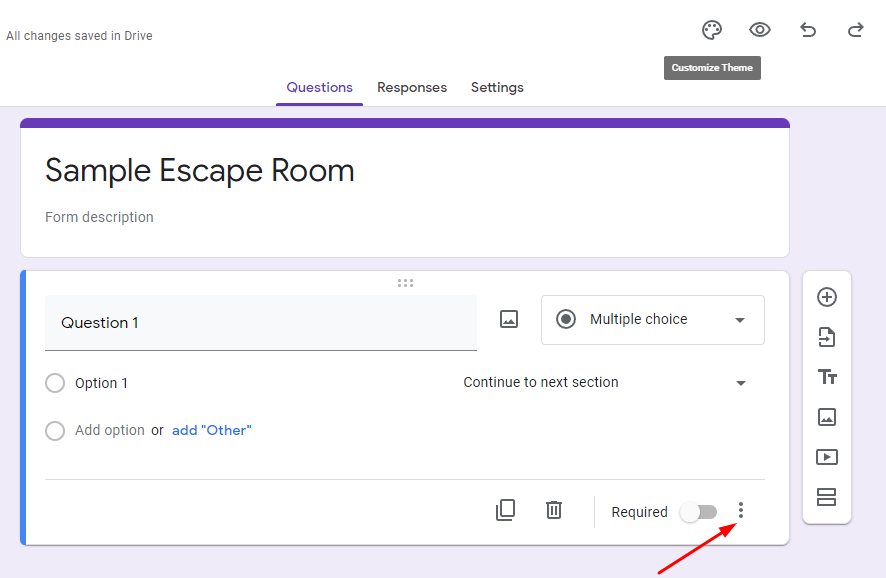
While creating the Google Form, click on the three dots as shown below:
 Select the option as shown:
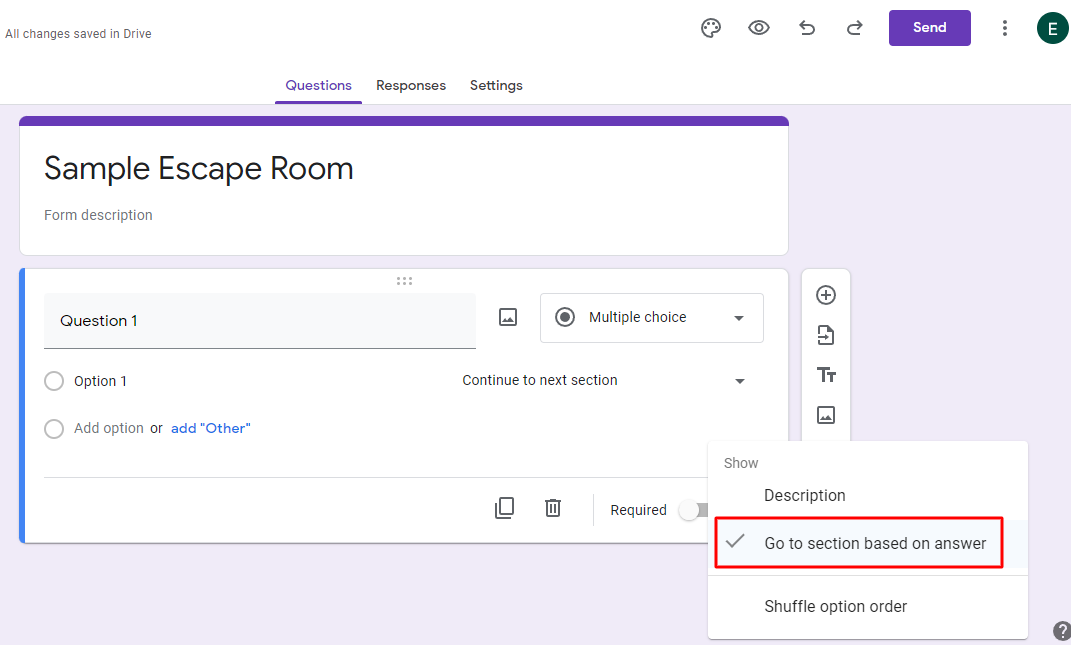 You’ll now get an option to select what happens based on what answer your students select.
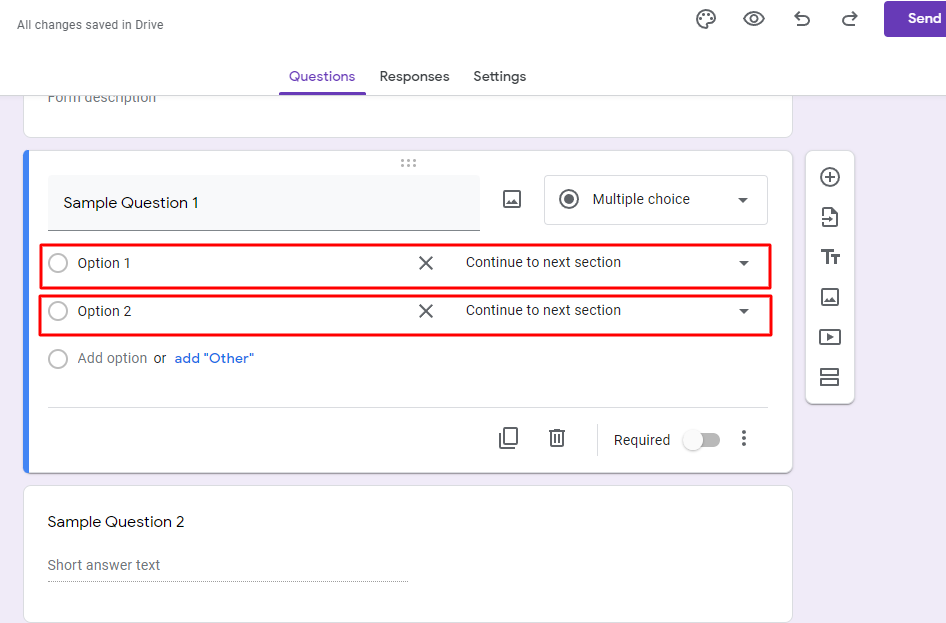 Choose from the options to decide what happens based on the answers:
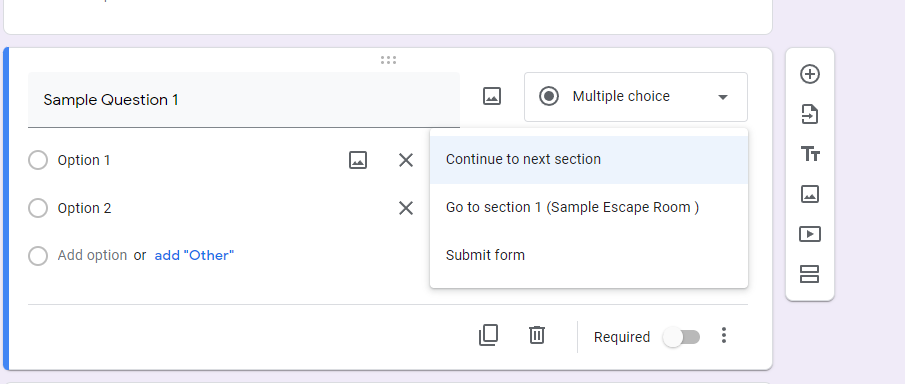 With that, you can set up logic branching in your Google forms. And once you know how to set it up, the sky is the limit as to how you can possibly use it in class.
Some ideas to get you started:
- In a comprehension-based test, students that answer a question correctly are directed to the next question and the ones who answer incorrectly are taken back to the reference text. This will give them a hint to read the passage carefully and attempt the question again.
- You can use logic branching to suggest books and give out reading recommendations to students. Based on which authors the students have read before and what genres they like, you can suggest books to your literature students. Or based on which questions your students get right or wrong, you can take them to sections suggesting which chapters they should be re-reading.
- Another fun use of logic branching could be to create an escape room through Google Forms. You can send out a list of hints and clues to your students and based on those they will have to figure out a set of codes. Upon entering the right code in the Google Form, the students will be allowed to submit the form and they’ll know they understood your hints and cues. The students who enter the wrong code, meaning they couldn’t crack the hints, will be shown an error message that tells them to think harder and try again.
- If you want to use Google Forms to create surveys for students, parents, or colleagues, you can watch this video tutorial:
2. Use Google Forms for attendance tracking (foolproof strategy)
It gets tough to keep a track of which student attended the class and who didn’t. Also, the smart students of the 21st century often have multiple tricks under their sleeves with which they try to get attendance for even the classes they haven’t attended.
But with Google Forms (and using it with Google Sheets), you can capture the actual student attendance in any class.
Here is how you can use Google Forms to create a foolproof attendance sheet.
Start by creating a simple form that requires students to enter their names and the date for which they are marking their attendance. (Don’t forget to make it a requirement to enter the name to be able to submit the form.
You can change the format of the date question to ‘Date’ from the drop-down menu.
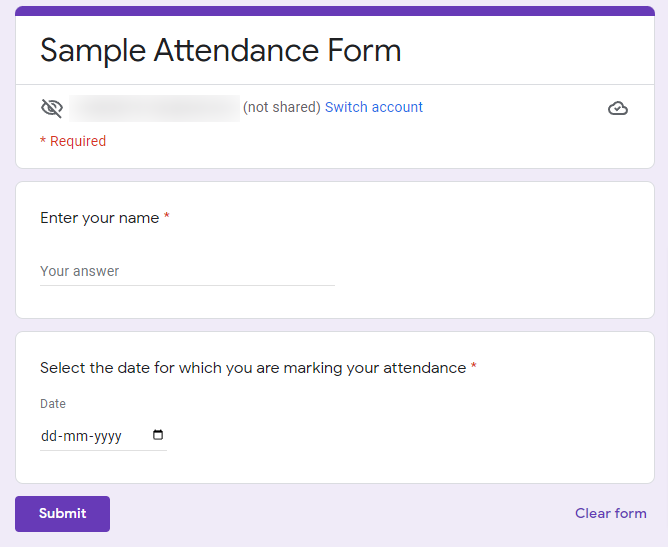
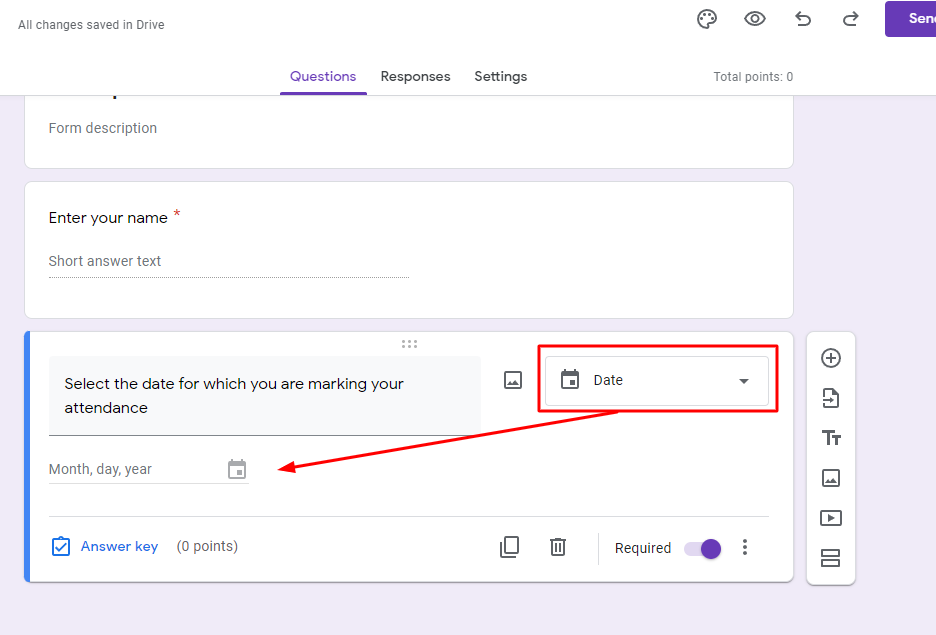 Your Google form will look something like this:
 After creating a Google form, click on the Excel icon in the ‘Responses’ tab
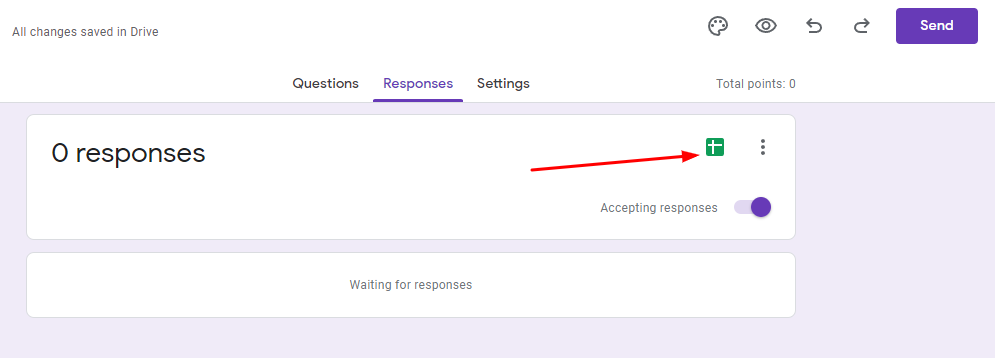 You can now either choose to create a new Google Excel sheet to add an existing sheet where the attendance records will be collected.
Now, when you get the responses from the students, all you must do is go to the Google Excel sheet, and there you’ll be able to see a list of all the students who attended the class and filled the attendance sheet after class.
However, the best part is that in the first column of the sheet, you can see the timestamp of when the form was filled.
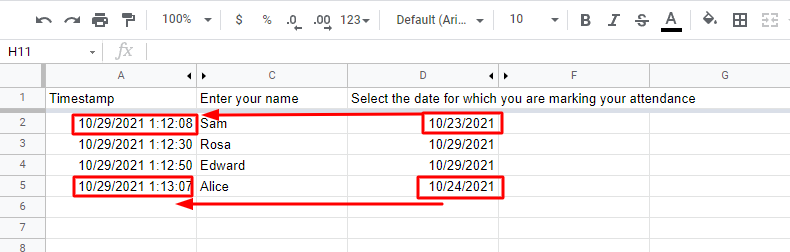 So even if students try to show that they attended the class on 23rd or 24th October by submitting an entry for it on 29th October, you’ll know exactly when the entry was made.
And when you see students entering incorrect dates in the attendance records you can send them a warning email to mend their ways and actually attend their class.
This cool little way to keep students under check will sure earn you the title of ‘tech-forward teacher’ in your class. Watch the video tutorial below for more guidance:
3. Collect Lab Data with Google Forms
Science lab sessions are fun. Collecting data is not.
Google Forms has this really cool feature that lets you see a summary of the data that you have collected through the forms.
So, when you have a Science Lab or STEM session, make sure you ask the students to input their findings in a Google Form. And when everyone is done submitting the responses, you’ll automatically see the numerical results in a graphical form.
This not just helps you get processed data but also ensures that you have a proper record of who did what and how in the lab.
More useful tips and tricks for using Google Forms:
- Want to know when students submit their forms? Keep the ‘Get an email notification for new responses’ option checked.
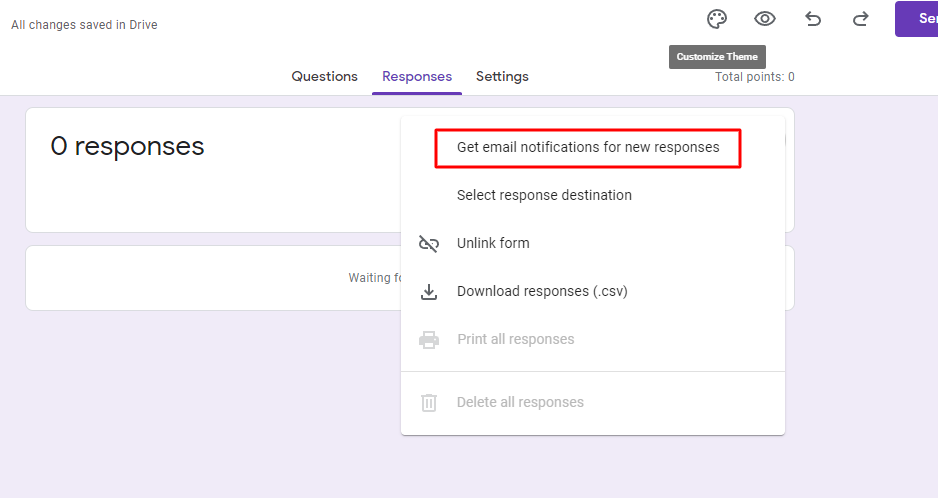 You can see this option upon clicking the three dots in the top right corner of the Response tab.
- Check the ‘Limit to one response’ option to prevent students from taking the test/quiz/survey multiple times. The option is available in the Settings tab:
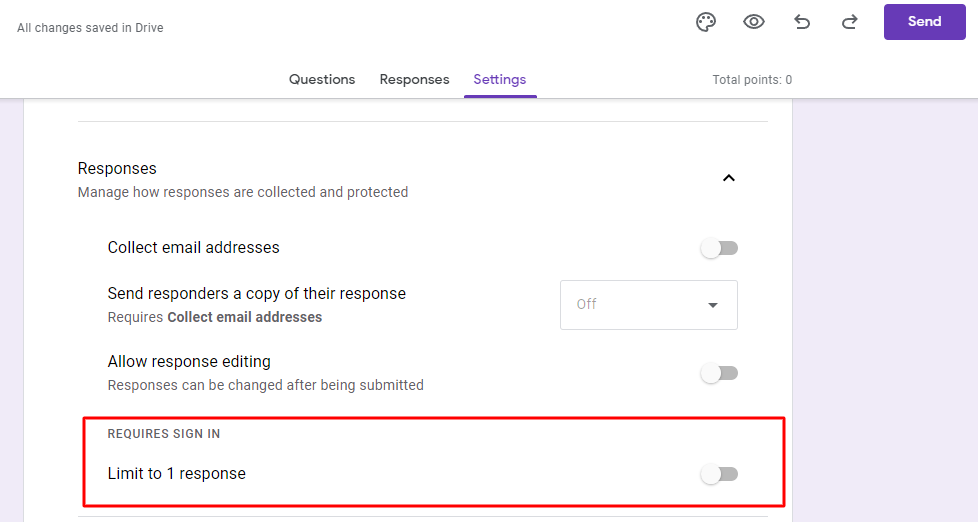 Use the toggle to activate the 1 response limit.
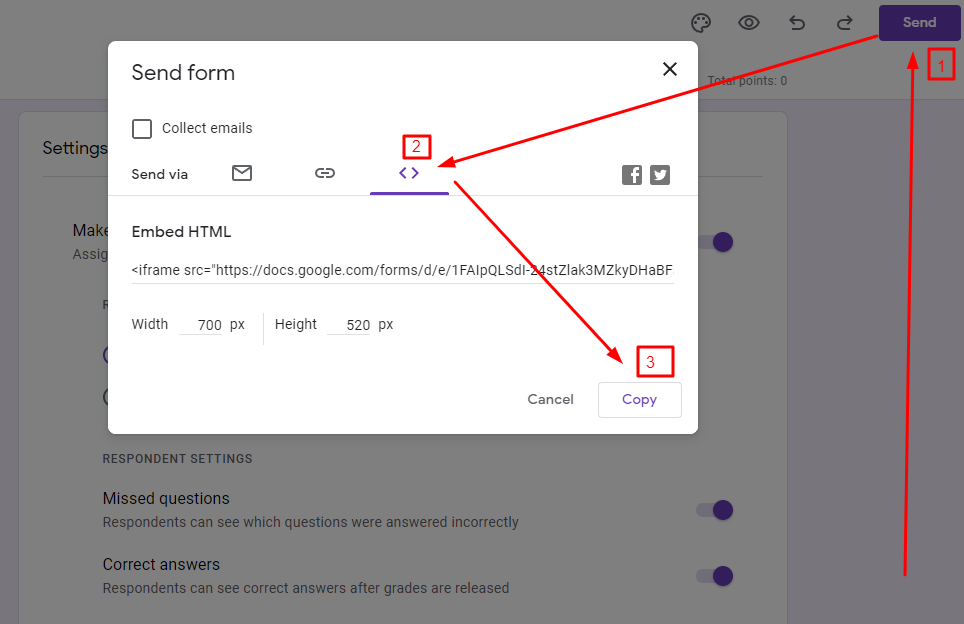
- While it is common knowledge that you can share the Google form via a link or an email, know that you can also use it on a website or landing page.
- Click on the ‘Send’ option
- Go to the third section
- Click on ‘Copy’ to copy the code and then paste it into the code editor of the webpage where you want to see your Google Form.
- Want students to answer a question based on their understanding of a video? You can also add a YouTube link directly to your Google form.
Click on the icon shown in the image below.
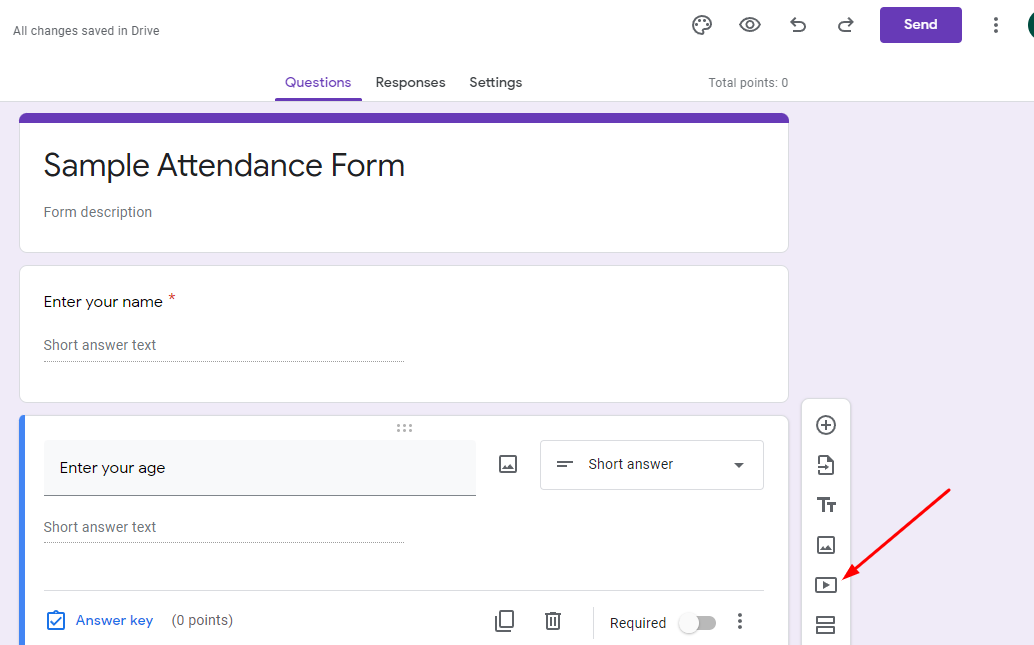 It will then give you an option to add a YouTube video which will then be embedded into your Google form. It will look something like this:
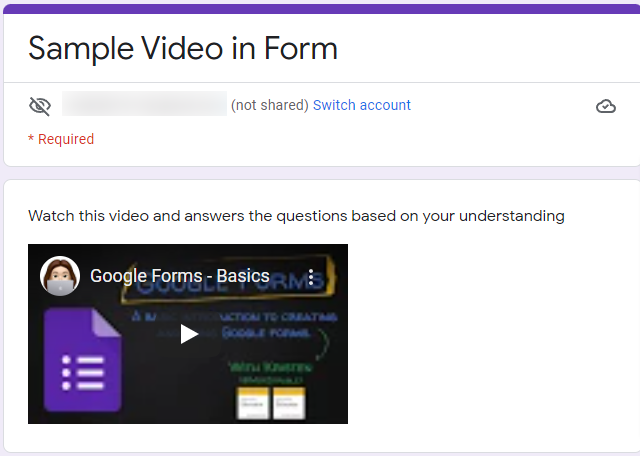 The video will be played in the form itself, which is safer as students will not be taken to YouTube where they may be exposed to content that is not relevant or suitable.
With that, it’s a wrap on the best ways for teachers to use Google Forms in a unique way. And surely you will come up with even more creative ideas so get in touch with us if you’d like to share them via our UK Education blog.






 never seize. Doctors need an extra hand while attending to patients, thus the need for physician assistants.
 . They often advance in practicing nurse and can take up some duties performed by the doctor. Nurses often create patient’s care plan, complete physical examination, order diagnostics tests as well as analyse results, among other responsibilities. For registered nurses looking to further their career and expand their scope of practice, an
  earnings. According to BLS, the expected growth rate is 31%. That’s not all. The
  and the














 First and foremost, biology would demand time and attention. To conquer A Level Biology, you should set a study schedule where your child would be able to dedicate their attention and focus. During this time, your child should be free from distractions and should be equipped with the right resources so they are able to
  As much as there are many different learning styles, there is also a myriad of learning tools available – even for biology. You and your child must work together to find the right learning tool for them.
 Actively communicating one’s knowledge of a subject, including Biology, helps the child recall the topic. Find opportunities where your child may be able to present to you, and then you can ask questions later to confirm their knowledge of the subject matter. Work together with your child during times when they have problems in elaborating a thought or are unable to answer your questions. This will also help to build their confidence.
 A Level Biology comes with learning assessments to gauge your child’s understanding of the course. It is ideal to expose your child to various practice exams in subjects like Biology on a regular basis so they will become familiar with the usual topics and questions that they will face when taking official assessments. Your child would also be made aware of the format of the A Level exams so they will not be taken by surprise and feel ready and confident.
 The first 4 strategies are helpful in their own right. But if you want to identify the best strategy in helping your child master A Level Biology in Singapore, it is advisable to consult experts such as
 “Learning is an act of curiosity and transformation. It is the powerful lever between your current world and a new world where you have a new experience.”
 Modern learning has a new emphasis.
 By the time students leave college, we want them to be able to apply what they’ve learned to the outside world. That’s why understanding the learning process and helping students navigate it is so important.
 If we want students to journey towards deep learning, we need to be aware of how to achieve it.
 Good note taking is just like learning itself. To take good notes is to follow a process that leads to true, individual understanding.
 You can’t pause a professor. You can’t immediately know what pieces of information to prioritize in your notes. And there’s always a trade-off between trying to get down as much as possible and focusing on absorbing the content at the moment.
 The important thing to understand is that note taking has two core functions.
 SQL or Structured Query Language is used extensively for manipulating databases. The SQL Murder Mystery (mystery.knightlab.com) starts with a story about a murder and a lost crime scene report.
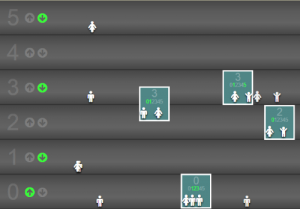 The gamer must program a set of elevators to carry the maximum number of people to the specified floors with minimum trips.
 Once you have mastered Elevator Saga, it is time to learn a little bit of AI. After all, what can be cooler than saying – I was
 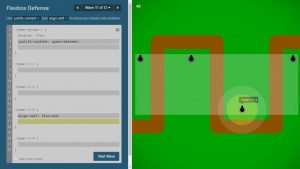 Websites are the backbone of the internet, and CSS is the backbone of websites. CSS or Cascading Style Sheets place HTML (HyperText Markup Language) elements on responsive web pages.
 It is the most well-known sandbox game made by none other than Majong and Microsoft. It can be equally enjoyed regardless of age because even
 We are all life students. As a university student, the main goal is to find your passion, achieve high grades for it, meet interesting people along the way, take care of yourself, have a blast, and graduate with an eager and positive outlook to apply your university learnings. However, there are clever methods you can utilize to increase your productivity and experience balanced college life. You can research some tips for
  Planning is half the job done. Make use of diaries, notebooks, lists, calendars, or an application daily. Tasks must be divided into hours, days, months, and categories. There are free
  Increased productivity can be attributed to taking regular breaks. Procrastination leads to cramming. Students who are bombarded with information in a limited period often do not perform well and do not retain information efficiently. Regular breaks such as
  A healthy diet and at least 8 hours of sleep are student essentials in achieving optimum brain function. In addition, it is integral to keep energy levels high to make studying productive, keeping a relaxed mind, and stress management. Students can also make use of
  Time management is an art and a habit that should be built at an early stage of life. It influences your efficiency from
  Once a project is broken down into more straightforward tasks, the next step is to set a deadline for yourself to indicate milestones of a project. Deadline completion gives a sense of fulfillment and progress that is an intrinsic requirement of any senior post. In addition, setting deadlines prevent procrastination, which is an enemy of productivity.
 3D modelling is a new and attractive way of
  These are some ways teachers and students can use 3D modelling in class for better understanding. However, when using 3D modelling software with a digital device,
  Ease of use: Because students don’t have experience in 3D modelling, it’s essential to choose a 3D modelling software that they can get started with easily, like